Tarva BXD · LumosIndex › Themes
1920 × 1080 · Landscape
 Index › Themes › Light & Dark
the mode layer
Index › Themes › Light & Dark
the mode layer
Themes · Light & Dark
The same surface, twice.
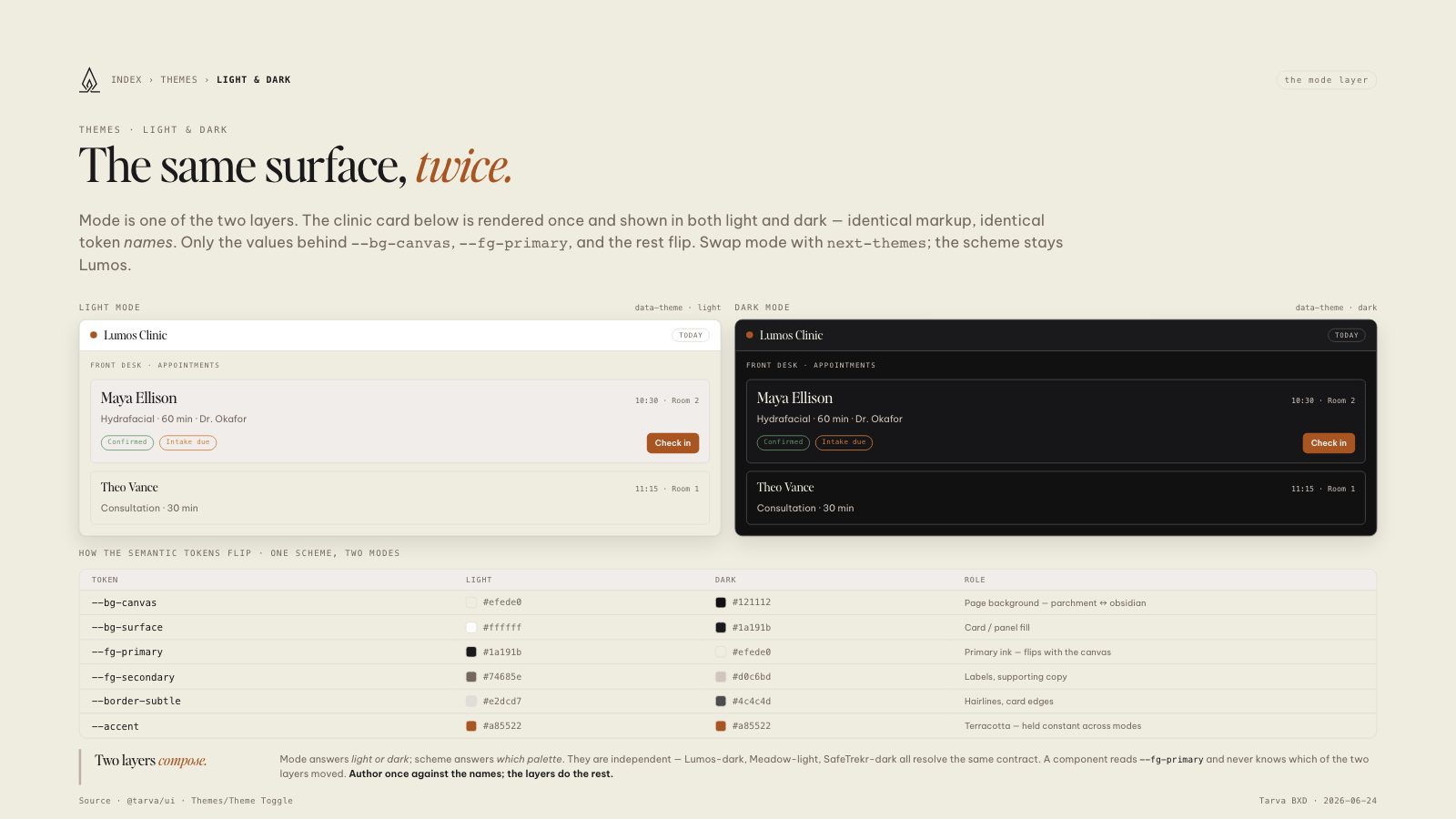
Mode is one of the two layers. The clinic card below is rendered once and shown in both light and dark — identical markup, identical token names. Only the values behind --bg-canvas, --fg-primary, and the rest flip. Swap mode with next-themes; the scheme stays Lumos.
Light modedata-theme · light
Lumos ClinicToday
Front desk · Appointments
Maya Ellison10:30 · Room 2
Hydrafacial · 60 min · Dr. Okafor
Theo Vance11:15 · Room 1
Consultation · 30 min
Dark modedata-theme · dark
Lumos ClinicToday
Front desk · Appointments
Maya Ellison10:30 · Room 2
Hydrafacial · 60 min · Dr. Okafor
Theo Vance11:15 · Room 1
Consultation · 30 min
How the semantic tokens flip · one scheme, two modes
Token
Light
Dark
Role
--bg-canvas
#efede0
#121112
Page background — parchment ↔ obsidian
--bg-surface
#ffffff
#1a191b
Card / panel fill
--fg-primary
#1a191b
#efede0
Primary ink — flips with the canvas
--fg-secondary
#74685e
#d0c6bd
Labels, supporting copy
--border-subtle
#e2dcd7
#4c4c4d
Hairlines, card edges
--accent
#a85522
#a85522
Terracotta — held constant across modes
Two layers compose.
Mode answers light or dark; scheme answers which palette. They are independent — Lumos-dark, Meadow-light, SafeTrekr-dark all resolve the same contract. A component reads --fg-primary and never knows which of the two layers moved. Author once against the names; the layers do the rest.
8.5 × 11 · Portrait